Embedding profiles and migrations
Define how passages are embedded, and move a knowledge base to a new profile in the background without downtime.
An embedding profile fixes how a source's passages are embedded and searched. Every data source and knowledge base uses one, and a knowledge base can only combine sources with the same profile. Models → Embedding profiles has two tabs: Profiles and Migrations.
Profiles
A profile defines:
| Setting | Notes |
|---|---|
| Embedding model | An embedding model from Models. The profile inherits its classification ceiling. |
| Dimensions and storage type | halfvec (half precision; indexes up to 4,000 dimensions) or vector (up to 2,000). |
| Output dimensions | Optional: store fewer dimensions than the model's native size, for models trained to allow it (Matryoshka models such as Qwen3-Embedding). |
| Document prefix and query prefix | Text some models expect before documents and questions. Adding a profile for a model with known prefixes fills them in (nomic-embed: search_document: and search_query: ; Qwen3-Embedding: its query instruction). |
| Chunk size and overlap | Passage size in tokens. |
| Default fusion weights | Optional: the vector and keyword weights for knowledge bases on this profile that don't set their own. |
Everything except the name, description, status, the default flag and the default fusion weights is fixed once the profile exists, because stored vectors depend on it. One profile is the platform default for new sources. A profile can be retired, or deleted once nothing uses it; the Profiles tab shows what uses each one.
Each profile has its own vector table, so different profiles never mix.
Migrations
To adopt a new embedding model, or other passage sizes, create a new profile and migrate each knowledge base to it. Search keeps working throughout, and nothing is fetched or parsed again.
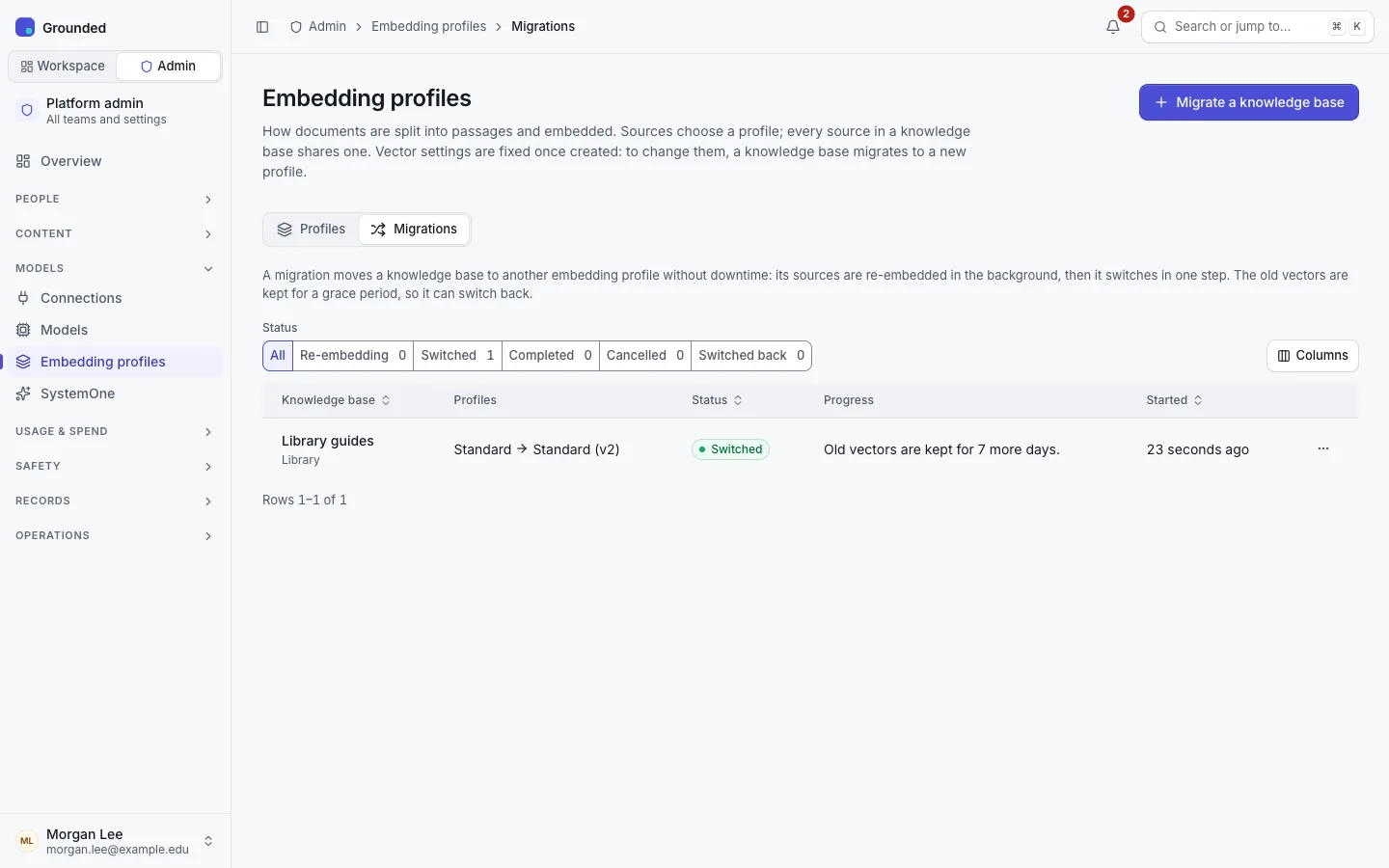
How a migration works
- In the background. Each source of the knowledge base gets a second set of passages and vectors for the target profile, filled from each document's stored text. When the passage settings match, passages are copied and only embedded again; otherwise they're cut again from the parsed text.
- Gently. It goes through the same batching as ingestion, at background priority, within the target connection's requests-per-minute limit. Live chat and search come first.
- Resumable. A restart, deploy or crash loses nothing: the job continues where it stopped. A gateway's 429 or 503 pauses it.
- One switch. Until every source has vectors for every ready document, the knowledge base keeps searching the old profile only. Then one transaction switches it, and every agent that uses it, to the new profile.
- Nothing lost in between. New uploads and crawls during a migration are embedded for both profiles, so neither the switch nor a switch back loses anything.
- Shared sources keep vectors for every profile a knowledge base using them needs, and are embedded only once per profile.
- A grace period. After the switch, the old vectors are kept, and kept current, for 7 days by default (
PROFILE_MIGRATION_GRACE_DAYS; each migration may set 0–90). Within it, Switch back returns the knowledge base to its previous profile at once. Delete old vectors now ends it early. - Failures are per document. A document that can't be embedded is recorded with its error and retried; after three attempts it waits for Retry failed documents. The knowledge base doesn't switch while any document has failed.
Starting, cancelling, retrying, switching and switching back are audited on the knowledge base. Platform admins are notified when a knowledge base switches or needs attention, and the team's admins and owners when their knowledge base changes profile.
Running one
Prepare
Add the new model and test it, then create the target profile. Set a requests per minute limit on the target connection, just below the gateway key's limit: without one the preflight can't estimate the time. Check storage: until the old vectors are deleted, the knowledge base holds two sets.
Preflight
Migrations → Migrate a knowledge base (or Change embedding profile… on a knowledge base's page, for platform admins who are members of the team). Pick the knowledge base and the target. The preflight shows each source's documents and passages, the tokens and requests the migration will need, and the time at the connection's limit. It lists:
- blockers, which keep Start disabled: the target is the current profile or retired, its model or connection is disabled, the knowledge base holds data above the model's classification, the dimensions exceed a limit, or another migration of this knowledge base is running or in its grace period;
- warnings: passages that will be cut again, shared sources, documents still processing, failed documents, no request limit, and a large migration without maintenance mode.
Start and watch
Choose how long to keep the old vectors, then Start migration. Follow the progress per source, with failed documents and their errors. For a very large knowledge base you can turn on maintenance mode meanwhile, so new ingestion doesn't compete for the embedding model. It doesn't pause migrations.
Check, then clean up
After the switch, check search on the knowledge base's Try it tab, its agents and its evaluation sets (sets set to run automatically run after a switch). If results are worse, Switch back within the grace period. When you're satisfied, Delete old vectors now, or let the grace period end.
Repeat for every knowledge base on the old profile, then retire or delete it.
Troubleshooting
| What you see | What to do |
|---|---|
| "The target profile's model or its connection is disabled; the migration waits." | Enable them. The job checks again every minute. |
| Failed documents | model_error often means the input is too long for the model: use a profile with smaller passages, or raise the model's input limit if it was set too low. Then Retry failed documents. |
| Progress pauses now and then | The gateway or the connection's limit is holding requests back. The job waits and continues. |
| Switch back is no longer offered | The grace period is over, or the old vectors were deleted. Start a new migration back instead. |
| Storage didn't shrink after the grace period | Cleanup runs every 10 minutes, in batches. A shared source keeps old vectors while another knowledge base still uses the old profile. |