Parsing and OCR
Turn on OCR for scanned documents, choose a backend, test it, and deal with documents that failed or need OCR.
Grounded parses PDF, Word, PowerPoint, HTML, Markdown and text itself. OCR reads what has no text layer: scanned PDF pages, and PNG, JPEG and TIFF uploads. It's off by default. With it off, parsing is exactly as without OCR: a PDF with no text is skipped as "Needs OCR", and images can't be uploaded.
How it works
- Only pages without a text layer are read. Grounded renders each such page to a greyscale image (300 DPI) and sends it to one backend. The text goes under the page's marker, so page numbers and citations work as for any page.
- An image upload is a one-page document. Only the first page of a multi-page TIFF is read, with a warning.
- A document's page says which pages were read, for example "Pages 3–7 were read with OCR (Tesseract)".
- The crawler still ignores images.
Choosing a backend
| Backend | Deploy | Good for | Cost |
|---|---|---|---|
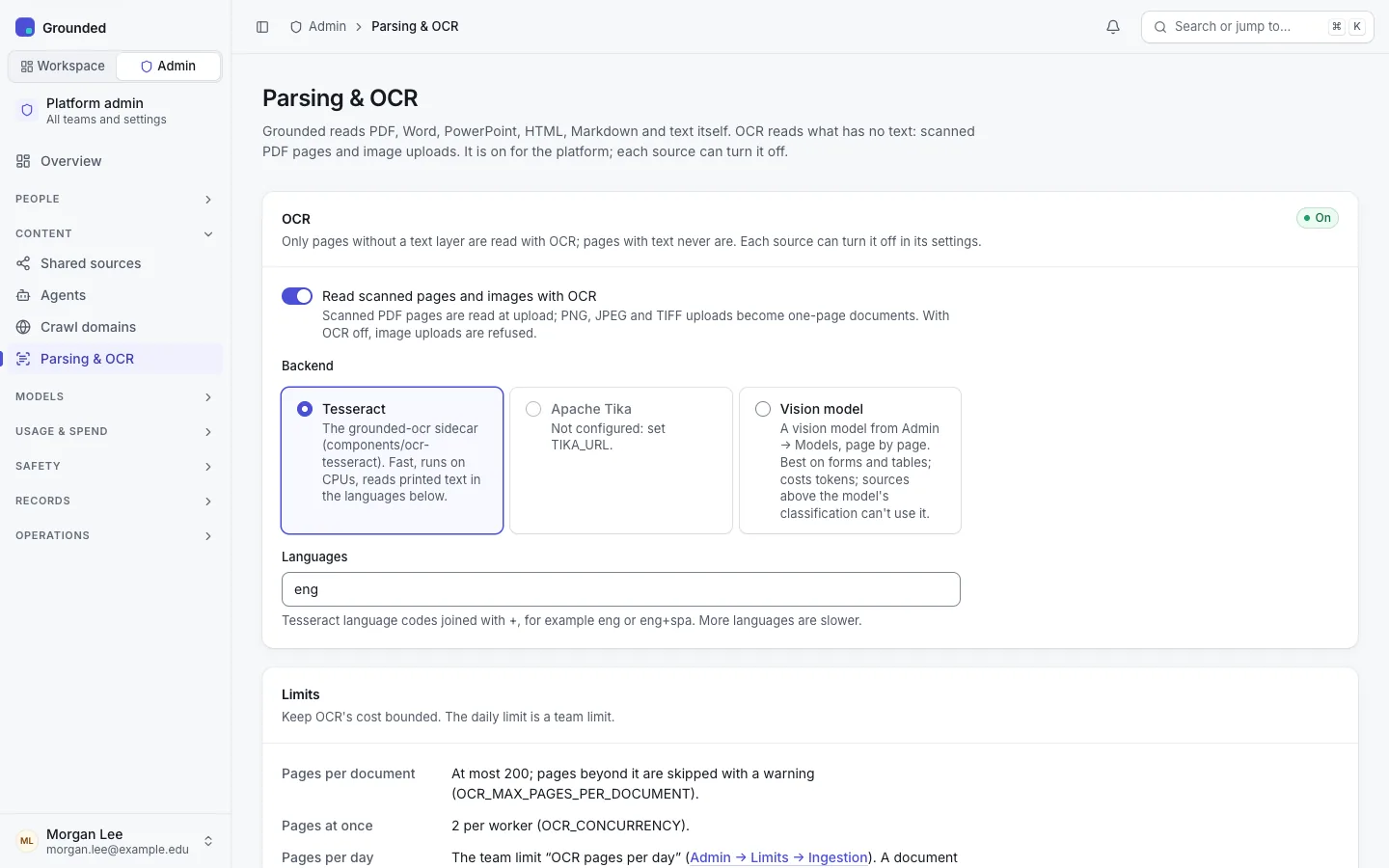
| Tesseract (recommended) | The ocr-tesseract component (the grounded-ocr sidecar image) | Printed text in the configured languages; fast on CPUs | CPU only |
| Apache Tika | The tika component with Tika's -full image | Installs that already run Tika | CPU; the full image is large |
| Vision model | A model of kind Vision (OCR) under Models | Forms, tables and complex layouts; returns Markdown | Tokens per page, recorded in the usage ledger |
Only configured backends can be chosen: Tesseract needs OCR_TESSERACT_URL, Tika needs TIKA_URL, and the vision backend needs a vision model. Deploying the sidecar is covered in OCR sidecar.
A vision model is subject to its maximum classification, like any model: sources classified above it get no OCR (their scans stay "Needs OCR", and images can't be uploaded to them). Choose a model approved for the data you scan, or use Tesseract, which runs inside your cluster.
Turning it on
Choose the backend
Content → Parsing & OCR: turn on Read scanned pages and images with OCR, choose the backend and the Languages (Tesseract codes joined with +, such as eng or eng+spa), or the vision model. List only the languages your documents use: more languages are slower and can be less exact. A vision model reads any language.
Test it
Test reads a built-in sample page with the backend on the form, saved or not, and shows the text, the time and the confidence (for a vision model, its tokens). A failure shows the backend's error.
Save
Changes are audited. Each source also has its own OCR switch (on by default), so teams can turn it off where scans are noise.
Documents that failed or need OCR
The same page lists documents that failed or need OCR, grouped by team and source: the count, the reason (needs OCR, OCR error, damaged or unsupported file, other failure) and the oldest date. It never shows file names, titles or text. For each group, platform admins can:
- Retry these: queue them again. Needs-OCR documents and OCR errors are refused, with the reason, while OCR is off for the platform or the source, or the vision model isn't approved for the source's classification. Damaged files usually fail again; the team has to fix and re-upload them.
- Notify owners: the team's owners get Documents need attention, in the app and by email, with the count and a link to the source's documents filtered to Failed or Needs OCR. They can't turn this notification off. Shared sources have no owners to notify.
Both actions are audited. Auditors see the list but not the actions. Teams can also retry their own needs-OCR documents from the source's Documents tab.
Bounds
- Per document: at most
OCR_MAX_PAGES_PER_DOCUMENTpages (200); the rest are skipped with a warning. - Per worker: at most
OCR_CONCURRENCYpages at once (2), across every document, so OCR can't take all of ingestion. - Per team per day: the team limit OCR pages per day (1,000, UTC day), under Limits. A document that would pass it waits and continues after midnight UTC, or at once when the limit is raised.
0blocks OCR for the team. - Pages are rendered at 300 DPI, lower for very large pages, so no image is more than 6,000 pixels on its longest side. Image uploads over 100 megapixels are refused.
Every document read with OCR records its pages in the usage ledger, with the backend; a vision model also records its tokens, which costs can price. Tesseract and Tika pages are counted, not priced.
Troubleshooting
| Symptom | Check |
|---|---|
Documents fail with ocr_unavailable | The backend didn't answer (network, 5xx, timeout). They're retried, then fail; retry them once the backend is back. Check the sidecar's pods and its NetworkPolicy. |
| "OCR could not read page N" | The backend refused that page; the rest of the document is indexed. |
| Scanned pages still skipped with OCR on | The source's OCR switch is off, the team's daily limit is 0, the vision model is disabled, or the source is classified above the vision model's level. |
| Poor text | Check the languages. Scans below about 200 DPI, or photos at an angle, read badly with Tesseract; a vision model does better on forms and tables. |