Classifications
Configure classification levels, the audiences and retention each allows, and how the rules are enforced.
Classification levels describe how sensitive data is, and Grounded enforces what each level allows: which models may process it, which audiences an agent may have, how long its conversations are kept, and more. Safety → Classifications manages the levels.
The policy is yours
Grounded provides the mechanisms, not the policy. Write each level's description in your organisation's words: what data belongs at it, and which data is not allowed on the platform at all. Put the same in your terms of use. Grounded doesn't detect prohibited data; it relies on people classifying sources correctly.
The default levels
| Level | Rank | Most open audience | Models by default |
|---|---|---|---|
| Open | 0 | Public | Any enabled model |
| Sensitive | 1 | Everyone who signs in | Models tagged Sensitive or higher |
| Restricted | 2 | Team | Only models an admin tags for Restricted |
You can rename them, change their descriptions and settings, and add levels (a separate level for especially regulated data, for example). A higher rank is more sensitive.
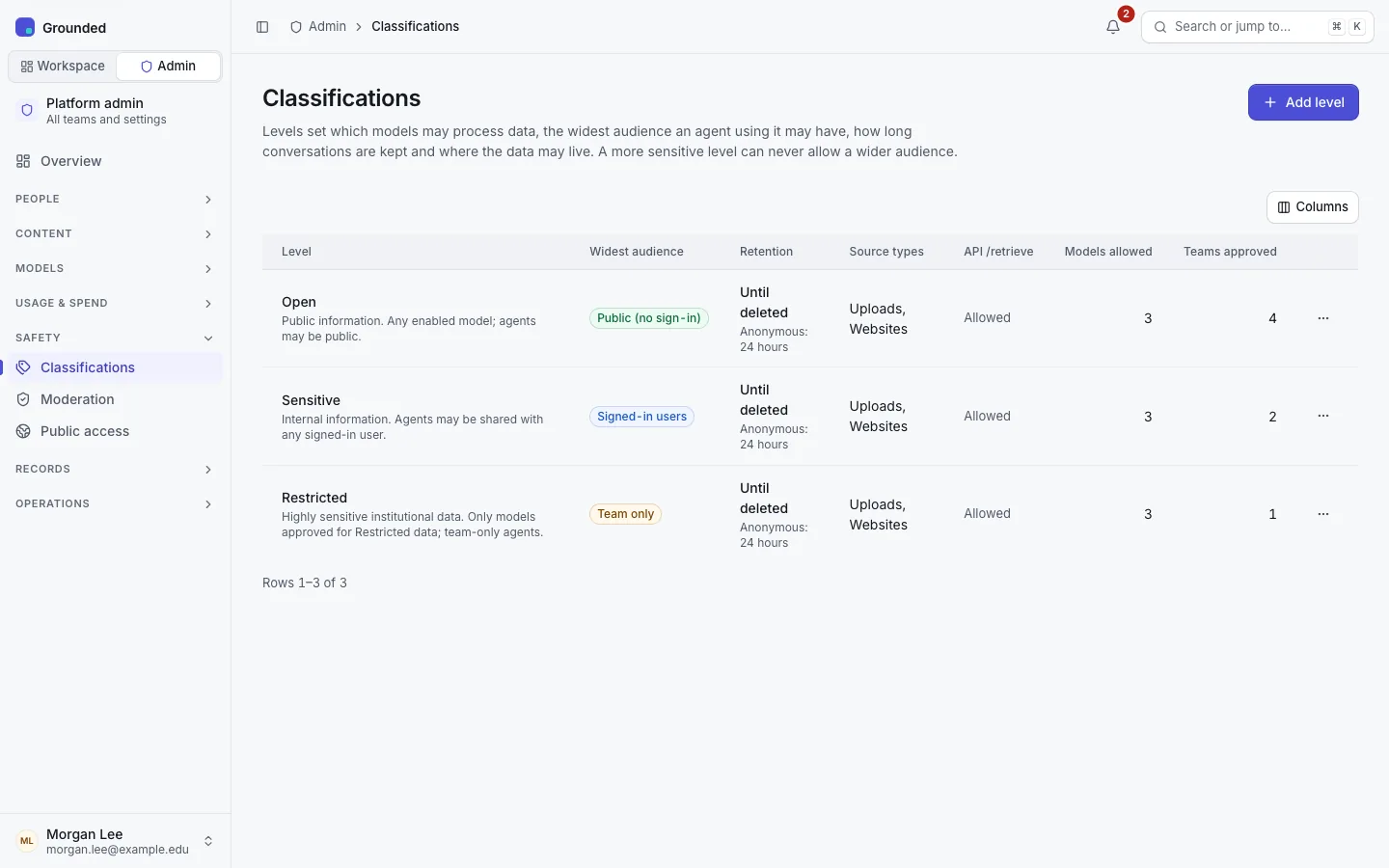
What each level sets
| Setting | Meaning |
|---|---|
| Name and description | What people see when they classify a source. |
| Most open audience | The widest audience an agent at this level may have. Narrowing it is refused while published agents at this level use a wider audience; the error lists them. |
| Conversation retention | Days signed-in conversations of agents at this level are kept after their last activity. Empty keeps them until the user deletes them. |
| Anonymous retention | Hours anonymous (public page and widget) conversations are kept. 24 by default. |
| Allowed source types | Which source types (upload, web) may hold data at this level. |
| Direct retrieval | Whether team API keys may call a knowledge base's /retrieve endpoint directly at this level, rather than only through agents. |
Confirm the retention periods with your records management before you set them. See Retention.
The rules
Grounded checks these when anything changes, and again on every question:
- Team ceiling. Each team is approved up to a level. Its sources can't be classified above it, and it can only attach shared sources within it.
- Computed levels. A knowledge base is as sensitive as its most sensitive source; an agent as the knowledge bases in its published version. Nobody sets these by hand.
- Model ceilings. A source's embedding model, an agent's chat model, and the moderation, SystemOne and vision models involved must each be approved for the data they process.
- Audience ceiling. An agent's audience must be allowed for its level.
- Raising is checked downstream. Raising a source's level is refused if it would break a rule for any knowledge base or agent that depends on it; the error names them. For a shared source, an impact preview shows admins every affected team. Nothing is ever unpublished silently.
- Lowering needs a reason. Lowering a source's level needs a team admin or owner and a written reason. The team's owners are notified, and it's audited.
- Every question is rechecked. Before retrieval, the published version's level, models and audience are checked against the current policy. If the check fails, the question is refused rather than answered with less.
The access log
Every use of an agent at a level above the lowest (Sensitive and Restricted, by default) is recorded in the access log: who, which agent, when.
Changing a team's approved level
On the team's admin page, Settings → Approved classification. Lowering it is refused while the team has data sources, or attached shared sources, above the new level; lower or remove them first.