Evaluations
Test sets that check a knowledge base still finds the right documents, and an agent still answers well, after things change.
Sources change, settings change, models change. An evaluation set is a list of test questions, each with what a good result looks like. Running it tells you whether a knowledge base still finds the right documents and whether an agent still answers well.
Evaluations are for a team's editors, admins and owners, in the app. Members, API keys and platform staff don't see them. Platform admins can turn the whole feature off; sets and runs are kept and come back when it's turned on again.
Where they are
- A knowledge base's and an agent's Evaluations tab: their sets.
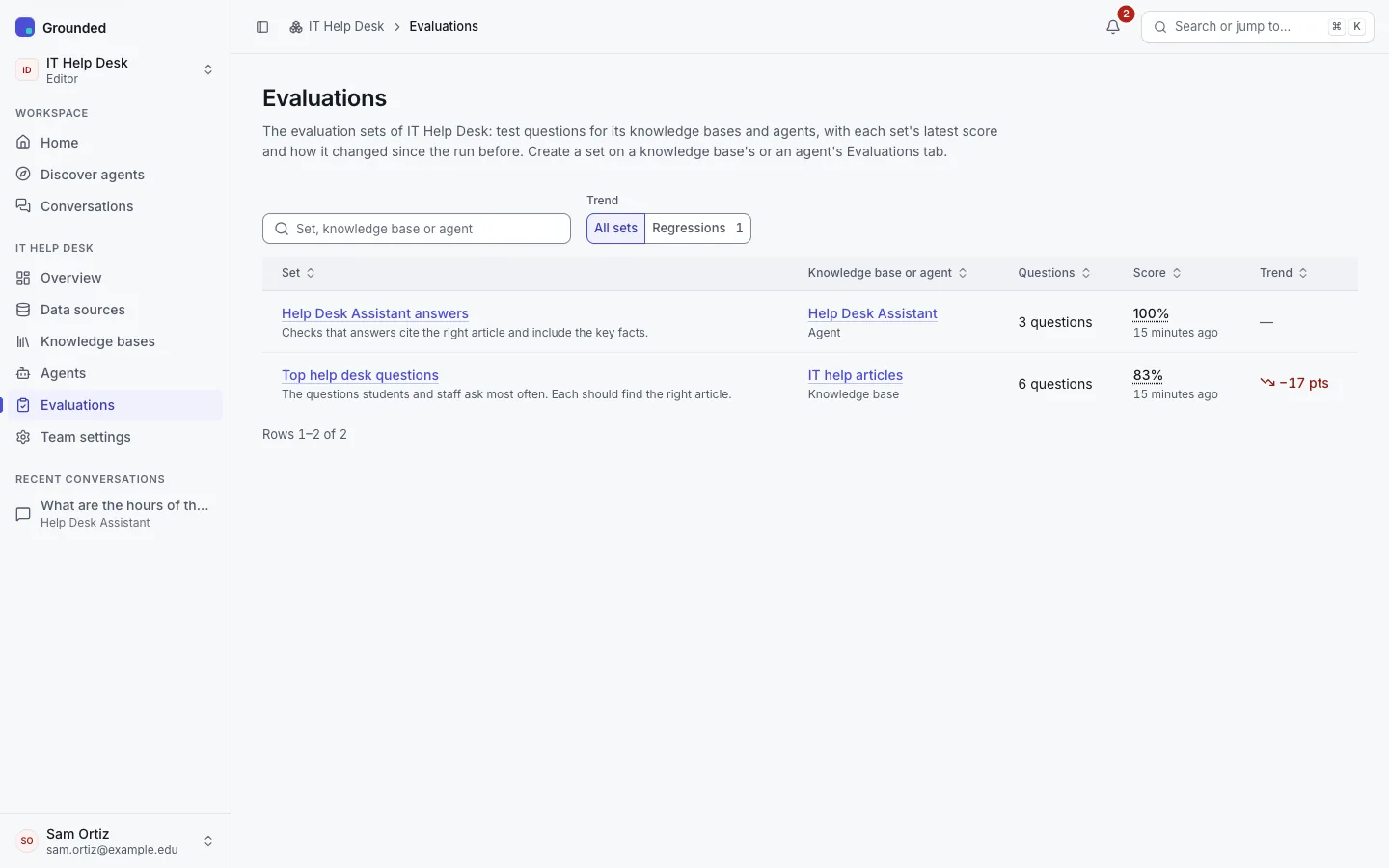
- The team's Evaluations page (sidebar, after Agents): every set in the team with what it tests, its latest score, the trend against the run before ("Down 10 points from 80%") and when it last ran. Regressions shows only sets that got worse.
- The team Overview: up to five sets' scores under "Quality & spend", regressions first.
Building a set
On a knowledge base's or agent's Evaluations tab, choose New set. A set belongs to that knowledge base or agent and is deleted with it.
- A knowledge base's set tests its search, with its own passages per search.
- An agent's set tests the agent's search across its knowledge bases with the agent's settings, and can also test its answers.
Each question says what a good result is:
- Expected documents: pick documents, or enter a URL, a URL prefix ending in
*(https://example.org/admissions/deadlines*) or a filename. Any one of them counts. URLs are compared without trailing slashes; filenames ignore case. - Must mention (agent sets only, optional): phrases a good answer contains. Case doesn't matter.
- A note for the team (optional).
The form warns, without blocking, when an expected document matches nothing in the knowledge base yet (usually a typo, or a document not added yet), and when a must-mention phrase appears in none of the agent's passages, since the answer can't then contain it from the sources.
Other ways to add questions
- Import (Questions tab → Import questions): a CSV file with
question,expected,must_mentioncolumns and an optionalnotecolumn, with|between several values; or a URL-judged JSONL file with one{"id", "question", "urls": [...]}per line. The preview lists rows that can't be used, by line, and rows whose documents match nothing yet. Add adds the usable rows. - Export a set as CSV from its "…" menu, in the import format.
- Add to evaluations from a chat: in your own conversations with your team's agents, an answer you rated down or one without sources offers it, and so does every answer in the agent's Try it panel. The question is copied, with the documents the answer cited as the expected ones, for you to keep or replace. After a "Not helpful" or "Incorrect" rating, the form first asks What should a good answer say? Nothing else from the conversation is copied.
Running a set
Run on the set's page starts a run. A set runs one run at a time.
The default, and nearly free: no chat model calls, only embedding the questions.
For each question, the knowledge base's or agent's own search runs, with its usual number of passages (k). The question passes when an expected document comes back in the top k. When none does, a second, deeper search (50 results) finds where it ranks ("Found at #11, beyond the top 6"); that doesn't change the result.
The run's Score is recall@k: the share of questions that passed. Its details add MRR (mean reciprocal rank): how high the first expected document comes back on average, where 1 means always first.
Questions that can't be scored say why, and are counted apart:
- Not in this knowledge base: nothing ever matched the expected documents. A typo, or a document not added yet.
- Document deleted: a picked document, or one an earlier run found, is gone.
- Check failed: for example, the model was unavailable.
Runs work within the team's limits: each question counts as a query (a failed question's deeper search as another), and full answers as chats. A per-minute limit makes the run wait; a daily limit or a used-up budget stops it, marked failed with the reason. Progress is live, and Cancel run stops a run and keeps its results so far.
Reading the results
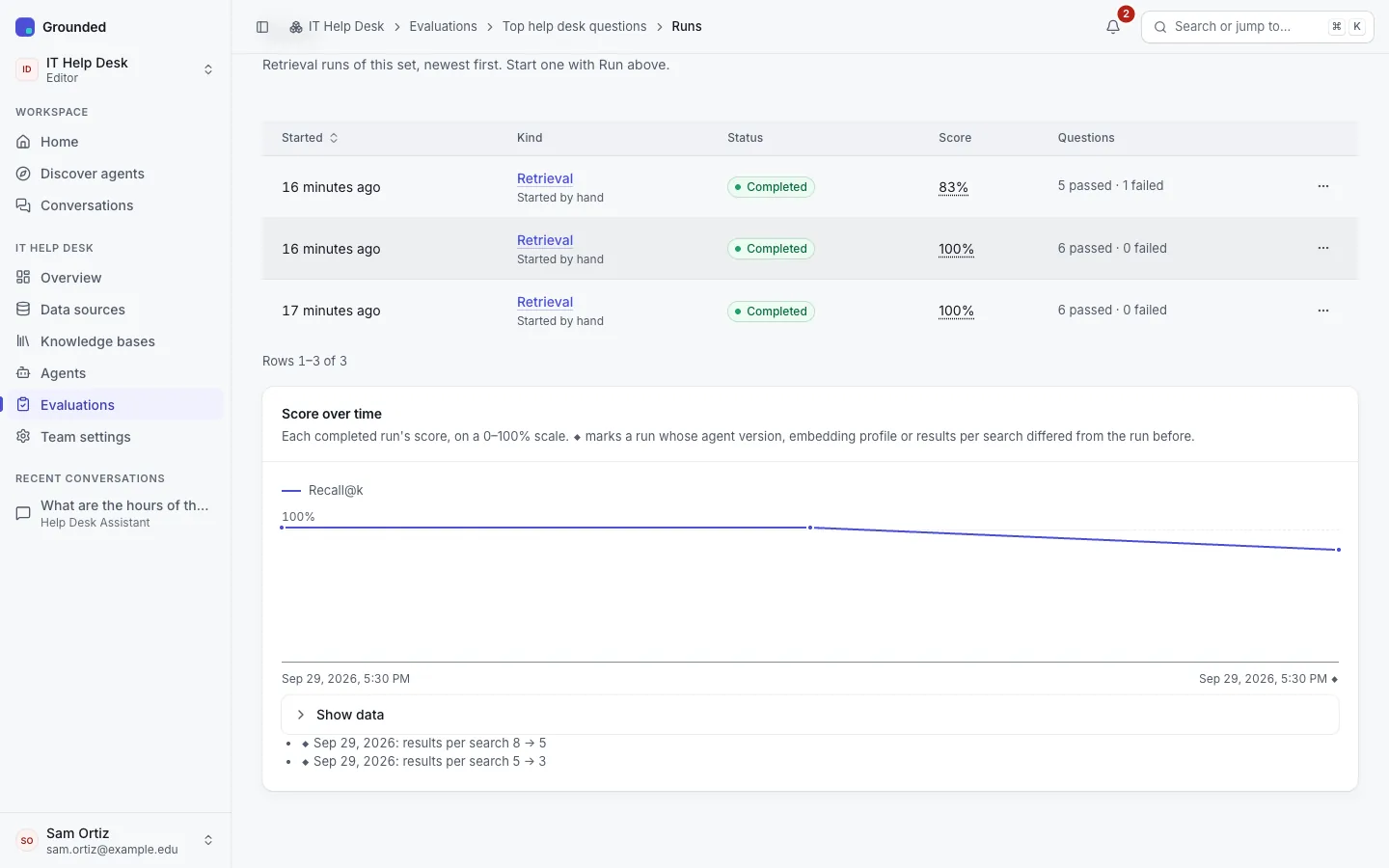
- The Runs tab lists runs, newest first, with their kind, status and score. From three completed runs of a kind, a chart shows the score over time on a fixed 0–100% scale. ◆ marks a run whose agent version, embedding profile or passages per search differed from the run before, and the list under the chart says what changed.
- A run says its result in a sentence ("1 of 2 questions found the right page."), with its scores, its configuration and its results. Filter to Failures. Compare shows which questions got better, worse or stayed the same against another run of the same kind.
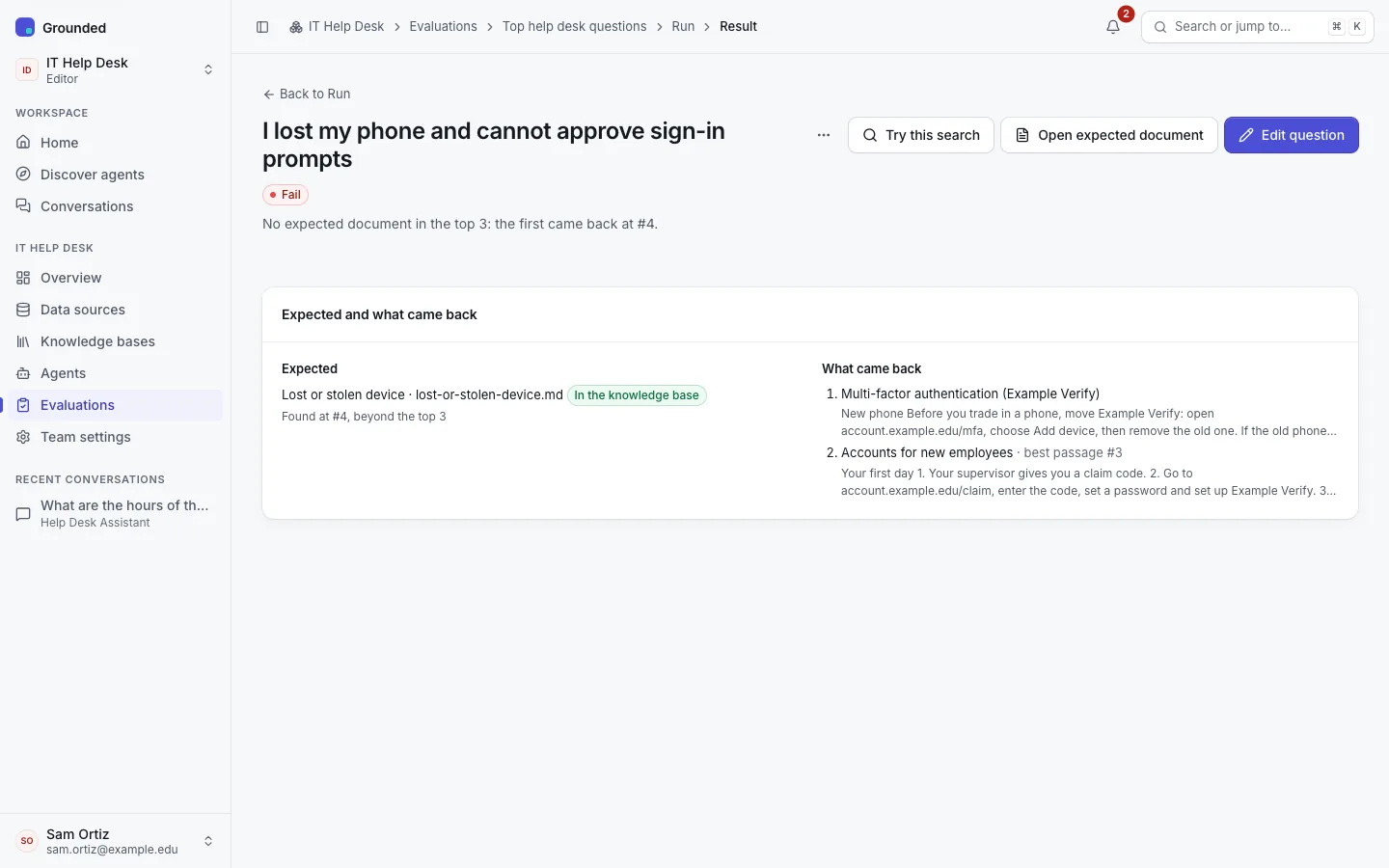
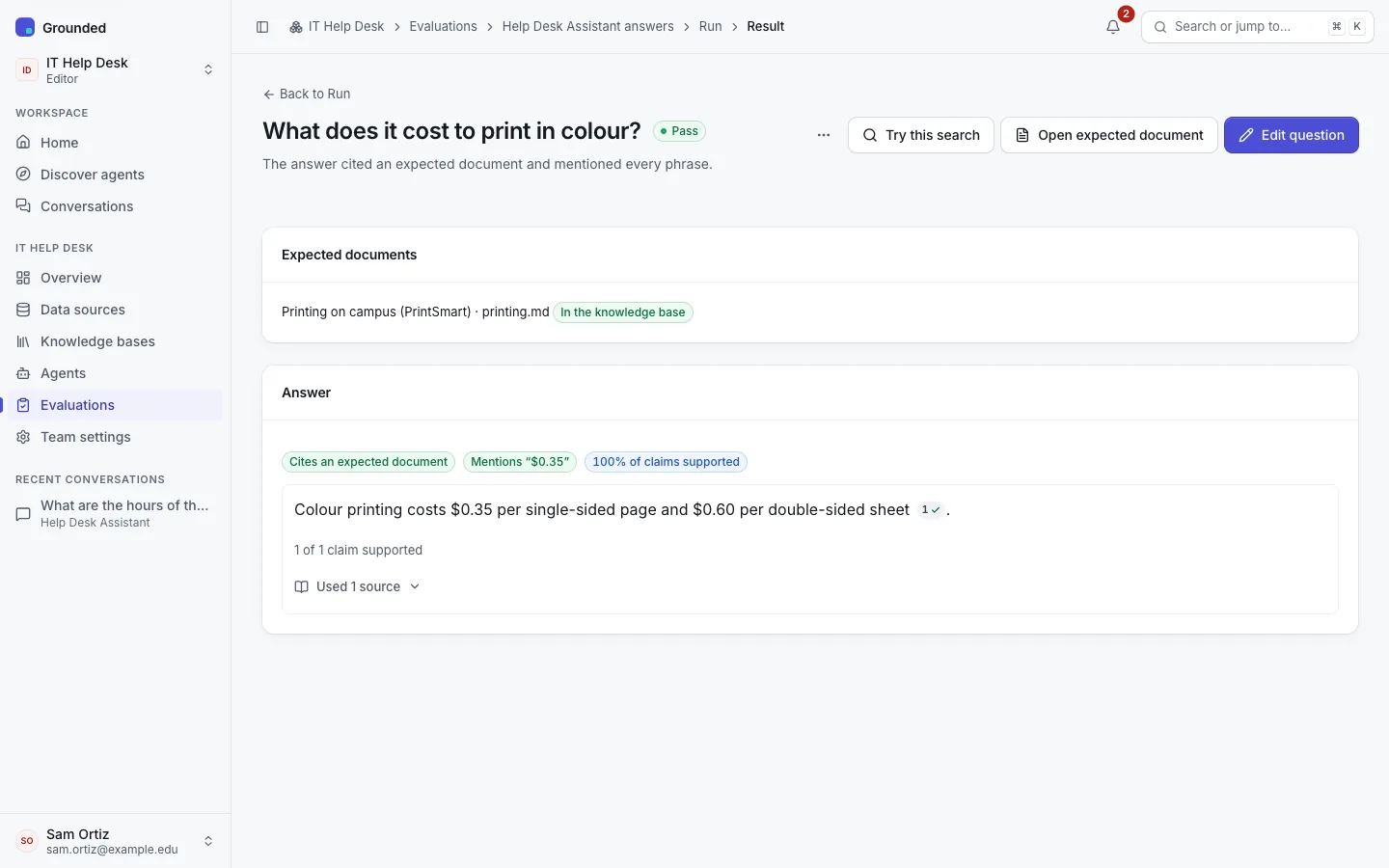
- A result shows Expected (each expected document, whether it's in the knowledge base, and the rank it came back at) beside What came back (numbered, each document once with the start of its best passage). For a full answer, it shows the answer with its citation chips and claim summary. Try this search opens the knowledge base's Try it with the question; Open expected document and Edit question do what they say.
Automatic runs
A set's Settings tab has Run automatically (off by default). Automatic runs are retrieval runs only:
- after the agent is published (they test the new version);
- after a knowledge base's embedding profile migration switches, or switches back;
- nightly at 03:00 UTC, when the set's knowledge bases had documents added, changed or deleted in the last day.
When an automatic run's recall@k is more than 5 points below the previous retrieval run, or a question that passed now fails, the team's editors, admins and owners get the notification Evaluation scores dropped. Each person can turn it off in their notification settings. Full-answer runs are always started by hand.
Limits and retention
- A team can have 50 sets, of up to 500 questions each, unless the platform sets other limits.
- Runs and their results are deleted after 180 days by default. They hold only the questions editors wrote and the agent's test answers, so legal holds don't apply to them. Deleting a question keeps its results in past runs.
- Creating, changing and deleting sets and questions, imports, and starting and cancelling runs are recorded in the team's audit log. Automatic runs are recorded with the system as the actor.