Retention and legal holds
How long each kind of data is kept, the dry run, retention runs, and legal holds that stop deletion.
Grounded deletes data only when a retention period says so, and never what a legal hold covers. Records → Retention has four tabs: Periods · Dry run · Runs · Legal holds.
Records management first
Transcripts, logs and audit entries can be records, for example under public records law. Confirm every period with your records management and legal counsel before you set it, and write down what was agreed. Until you set a period, Grounded keeps the data.
What is kept, and for how long
| Data | Default | Where it's set |
|---|---|---|
| Signed-in conversations | Keep until the user deletes them | Per classification level: "Conversation retention" |
| Anonymous conversations (public page, widget) | 24 hours | Per classification level: "Anonymous retention" |
| Conversations users deleted | Keep (hidden from the user at once) | Periods: grace period (0 = next run) |
| Access log | Keep | Periods |
| Analytics events (per-answer metadata) | Keep | Periods |
| Usage ledger | Keep | Periods (at least 7 days); rolled up per day before deletion |
| Audit log | Keep | Periods (at least 30 days); legal hold entries are never deleted |
| Files of deleted documents and sources | Keep | Periods (0 = next run) |
| Expired or revoked invites | Keep | Periods |
| Evaluation runs and their results | 180 days | Periods |
| Anonymous and browser sessions | Removed when they expire | Not configurable |
Everything is kept until a period is set, except anonymous conversations, evaluation runs, and expired sessions.
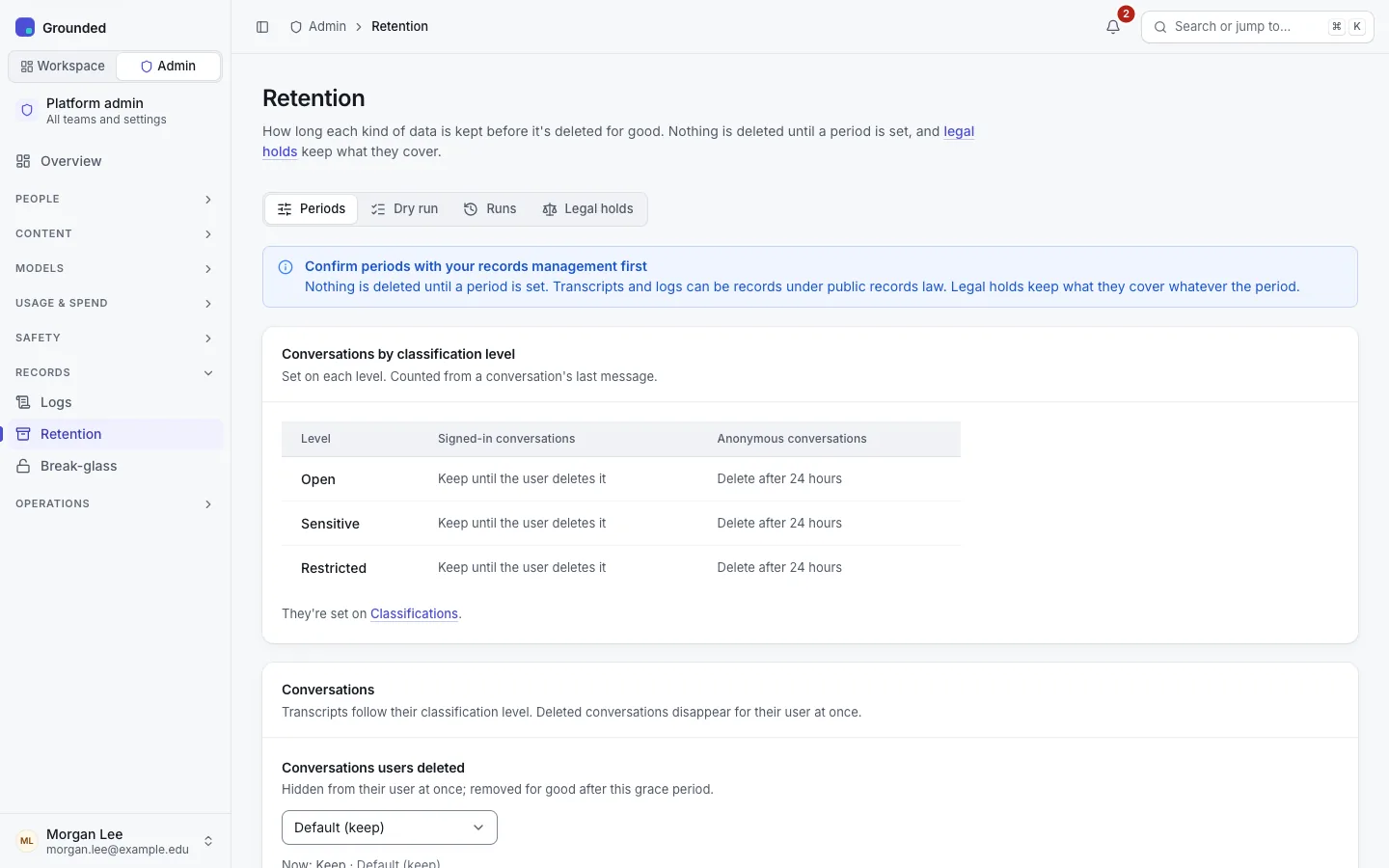
Setting periods
Each period has an environment default (RETENTION_*_DAYS; empty or keep keeps the data) and an optional platform setting. On Periods, each kind is Default (use the environment value), Keep, or Delete after N days. Environment defaults suit installs managed as code, where the agreed periods live in configuration.
Saving a period that deletes more (shorter, or a period where there was none) asks for confirmation first. Changes are audited with before and after values.
Check before you change: the dry run
Dry run shows what a run would delete now, per kind, with a breakdown per team, classification level, audience and reason, and how much legal holds keep. It runs read-only: viewing it deletes and writes nothing. The dry run and the job use the same query per kind, so a run deletes exactly what the dry run shows, plus anything that became due in between.
Runs
- A job runs every 10 minutes on the workers, and on demand with Runs → Run now. Only one run happens at a time.
- Each kind is deleted in bounded batches (
RETENTION_BATCH_SIZErows per transaction,RETENTION_MAX_BATCHESbatches per kind per run). A larger backlog continues at the next run. - A failing kind (object storage unreachable, say) is recorded and retried at the next run; the other kinds still run.
- Each run is listed with counts per kind. A run that deleted something writes an audit entry as the system, with counts only: no content, IDs or names.
- Metrics record deletions, held rows, errors and the last success per kind. Alert when a configured kind hasn't succeeded for a while; the shipped alerts do.
What deletion means
- Conversations are deleted with their messages. Analytics events keep their metadata and lose only the link.
- User deletes: a conversation disappears for its user at once; the stored copy goes after the grace period, or earlier if its level's period passes. The delete dialog tells users that records rules may keep it longer, never whether a hold exists.
- Usage ledger: events are added to daily totals (UTC day, kind, team, agent, model, channel; no user or key) before deletion, so analytics totals stay the same.
- Deleted documents and sources leave search at once (passages and vectors are deleted immediately); their stored files wait for the files period.
Legal holds
A legal hold stops every retention deletion of what it covers until it's released. Holds never expire.
| A hold on | Keeps |
|---|---|
| A user | Their conversations (including ones they deleted), access log and usage entries, audit entries by or about them, analytics events of their conversations |
| A team | Conversations with the team's agents, its access log, analytics, usage and audit entries, its deleted documents' files, its expired invites |
| An agent | Its conversations, access log, analytics, usage and audit entries |
| A conversation | That conversation and its analytics events |
A hold can be limited to a date range of the data.
- Only platform admins place and release holds; auditors see them. Team members never do: hold entries don't appear in team audit logs, and nobody is notified.
- A hold applies from the next retention batch (seconds). It doesn't restore anything already deleted.
- A hold preserves; it doesn't grant access. Transcripts stay readable only by their user, and users can still delete their conversations from their own view (the stored copy is kept).
- It doesn't keep document passages and vectors, only documents' stored files. Evaluation runs aren't covered.
Procedure
Get the request in writing from legal counsel or your records officer: what to preserve (people, teams, agents, conversations) and the dates.
Legal holds → Place a hold for each scope: a user's email or ID, a team from the list, an agent as team/agent or its ID, or a conversation ID. Give the reason (the matter or request reference) and the date range if the request names one.
Check Dry run: what the hold keeps shows under "Kept by legal holds".
When counsel confirms the matter is closed, Release hold with the reason. What the hold kept is deleted at the next run if its period has passed, so check the dry run first if that matters.
Holds stay listed, with a Status filter (Active, Released), for good. Placing and releasing are audited, and those entries are never deleted.