SSO groups
Map identity-provider groups to team roles, so memberships follow your directory at every sign-in.
SSO group mapping lets you say, for example, "people in the admissions-staff group are editors of the Admissions team". Grounded applies the rules each time someone signs in with OIDC, adding, raising, lowering and removing the memberships the rules created. Members added by hand are never touched.
Nothing happens until a rule exists. Without rules, sign-in only records each person's groups, for the dry run below.
Before you start
Your identity provider must put the person's groups in the ID token, in the claim named by OIDC_GROUPS_CLAIM (default groups). Grounded doesn't call the userinfo endpoint. See OIDC and SSO for Authentik, Keycloak and Microsoft Entra ID.
Matching ignores case and surrounding spaces. Up to 1,000 groups of up to 256 characters are kept per sign-in.
Rules
People → SSO groups lists every rule: the group, the team, the role (owner, admin, editor or member) and how many memberships it grants now. A team's own rules are also on its admin page's SSO groups tab. Platform admins add, change and delete rules; auditors see them read-only.
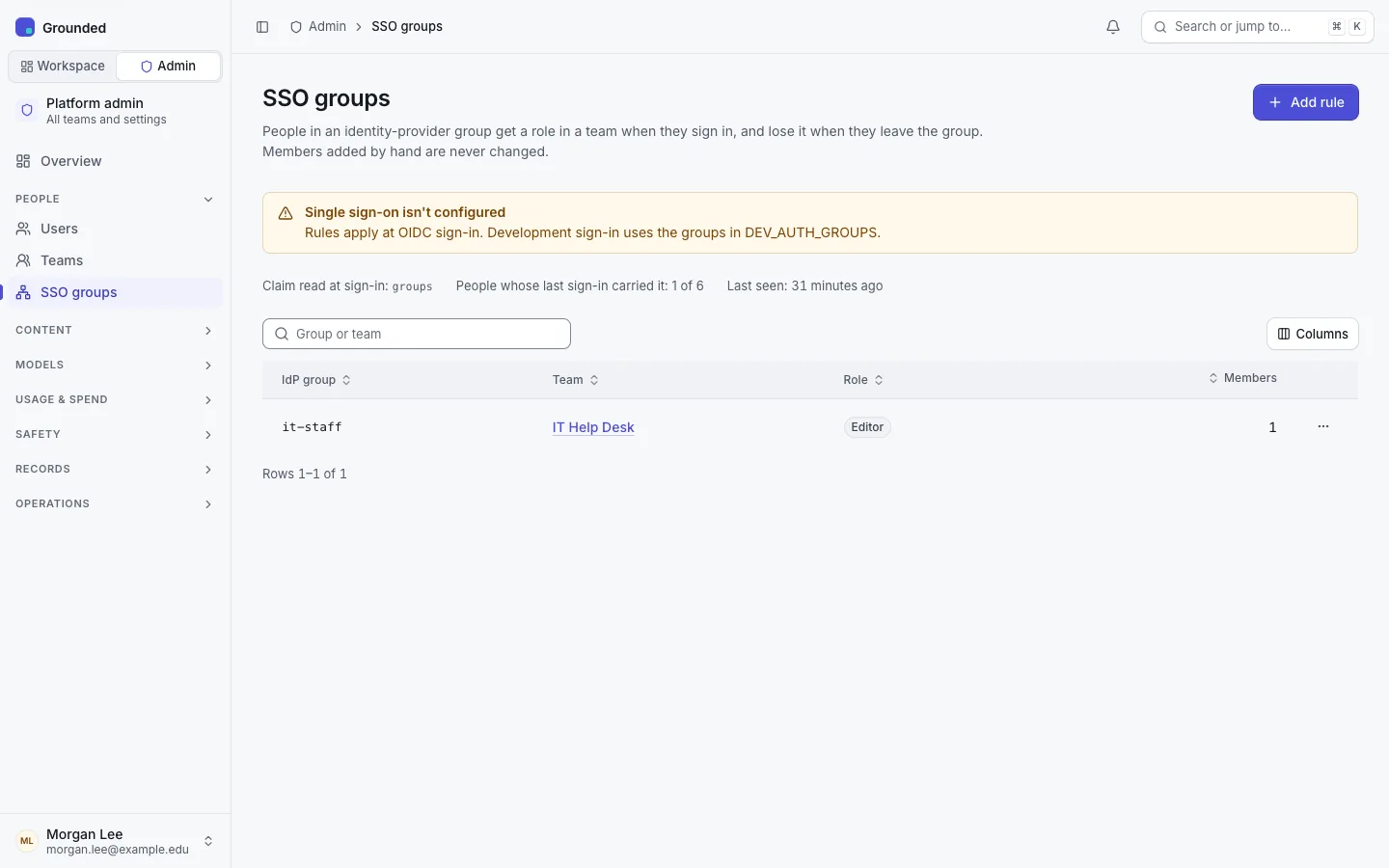
- One rule per group and team. A rule's team can't change: map the group to another team with a new rule.
- Rules for an archived team are ignored, and no rule can be added to one.
- Every rule change is audited, in the platform log and the team's log.
The dry run
The rule form, and the delete confirmation, show what saving would do: who would be added, whose role would be raised or lowered, who would be removed, and who matches but is left alone (members added by hand, and a team's last owner). It uses the groups each person had at their last sign-in. People who haven't signed in since, or whose groups changed since, aren't listed; they're matched at their next sign-in.
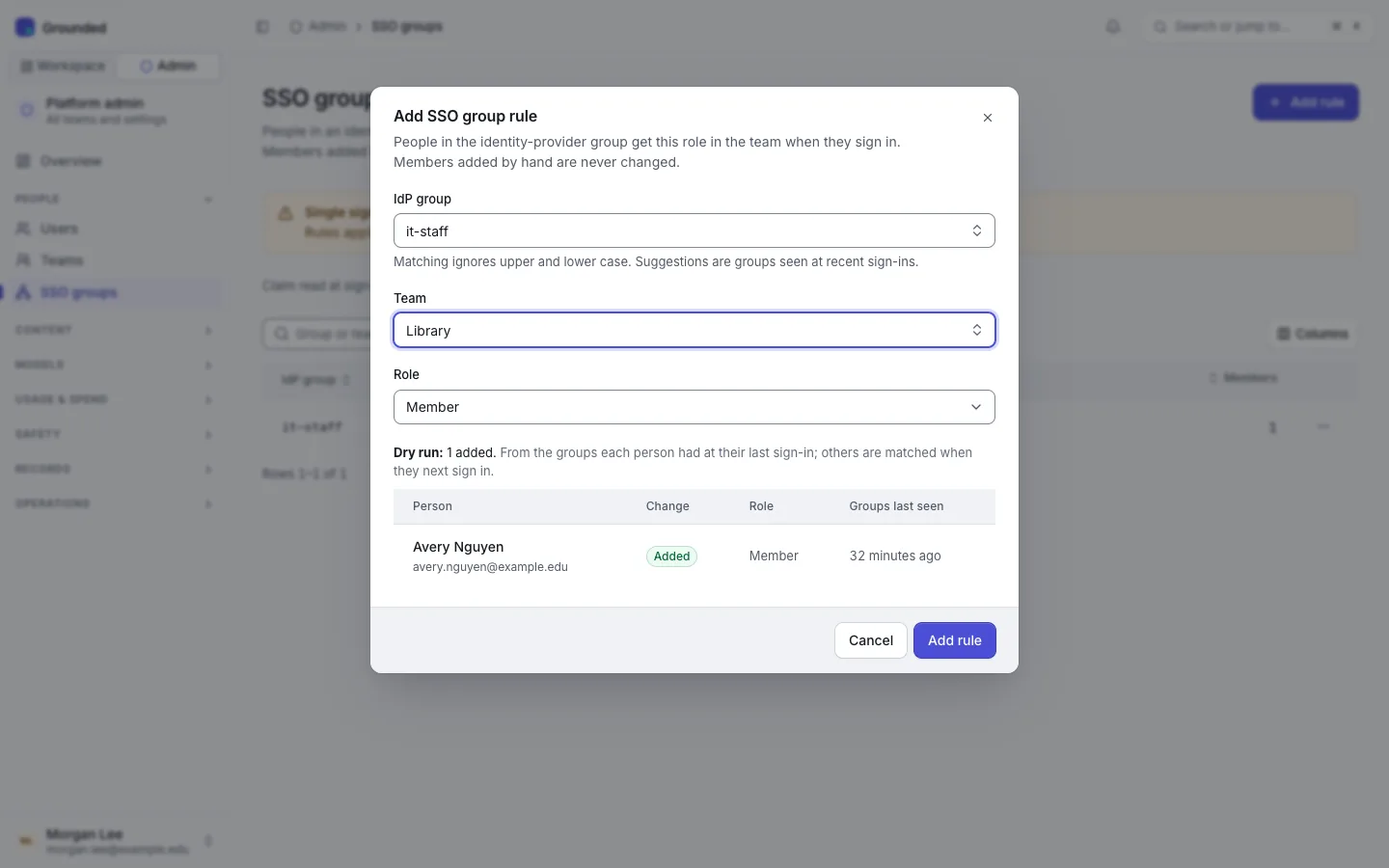
Saving or deleting a rule applies it immediately to everyone the dry run listed. After that the rules apply at every sign-in. Nobody is notified by the app; the changes show in the team's audit log.
What happens at sign-in
After any invites for the person's email are accepted, Grounded reads the groups claim, saves it as their last-seen groups, and for each team:
- Adds or raises. They get the role of the rules they match: a new membership, or a higher role for one the mapping created. When several rules match one team, the highest role wins.
- Lowers or removes. A membership the mapping created is lowered to the role of the rules still matched, or removed when none matches. Removal also revokes the person's personal API keys for that team, as a manual removal does.
- Never touches hand-made memberships. A membership added by hand, by invite, or by a platform admin's Assign owner is never changed by a rule, even to a higher role. To let a rule manage such a member, remove them by hand; the rule adds them back at their next sign-in.
In the team, members a rule manages show Managed by SSO group name. Owners and admins can't change or remove them by hand, and they can't leave the team themselves. Assign owner is the one exception: it turns the membership into a hand-made owner, so a recovery isn't undone at the next sign-in.
The last owner
A rule never lowers or removes a team's last owner. If someone whose owner role came from a rule leaves the group while they're the only owner, the membership is kept, and each such sign-in is recorded. Once the team has another owner, the next sign-in removes or lowers them.
When the claim goes missing
A sign-in without the groups claim counts as no groups: memberships the mapping created are removed. If your identity provider stops sending the claim, the next sign-ins remove those members, and the sign-ins after you fix it add them back. The startup log, grounded doctor and Needs attention on the Overview warn (sso_groups_claim_missing) when rules exist but no sign-in in the last 30 days carried the claim.
Audit
Memberships a rule changes are audited like manual changes, with the system as the actor: "System (group mapping: group → team)". In the audit log, the SSO groups area shows rule changes and the memberships they made; the person filter System (group mapping) shows only those memberships.
Limits
- Groups are read at sign-in only. Someone removed from a group keeps the membership until they sign in again (browser sessions last 12 hours by default), and their personal API keys keep working until then. For an immediate stop, delete or change the rule, or suspend the user.
- A new rule uses each person's groups from their last sign-in, which may be out of date. Check the dry run's Groups last seen column.
- There's no SCIM provisioning.
Trying it locally
With development sign-in, DEV_AUTH_GROUPS gives the development personas groups, for example DEV_AUTH_GROUPS=alex=admissions-staff. Add a rule for admissions-staff, then sign in as that persona: they join the team. Remove the persona's group, restart and sign in again: they're removed.