Usage and spend
The team's limits and what it has used, and this month's spend against the budget when the platform tracks costs.
Team settings → Usage & spend shows owners and admins what the team uses against its limits and, when the platform tracks costs, what that use costs. While cost tracking is off for the team the tab is called Usage & limits. Editors see usage and limits, never money.
Limits
Each limit has a platform default, and a platform admin can override it for your team. Team admins and owners can see limits but not change them.
| Limit | Default |
|---|---|
| Storage (original document sizes) | 10 GiB |
| Documents | 50,000 |
| Data sources | 100 |
| Knowledge bases | 50 |
| Agents | 25 |
| Crawl pages per day | 5,000 |
| Concurrent crawls | 2 |
| Concurrent ingestion jobs | 8 |
| OCR pages per day | 1,000 |
| Questions per minute: team, each API key, each person | 600, 300, 120 |
| Questions per day (team) | 50,000 |
| Chat tokens per day (team) | 2,000,000 |
| Concurrent chats per person | 3 |
| Evaluation sets, questions per set | 50, 500 |
These are Grounded's built-in defaults; your platform may use others. The tab shows the values in effect and a meter for each, including this minute's count for per-minute limits.
What happens at a limit:
- Resource caps (storage, documents, sources, knowledge bases, agents) refuse the upload or creation that would pass them.
- Crawl pages per day and OCR pages per day make work wait until the next day (UTC), or until the limit is raised. Nothing fails.
- Query and chat limits refuse with "rate limited" or "quota exceeded". Per-minute limits clear within the minute; daily limits reset at midnight UTC.
Team admins and owners get a notification when the team reaches a daily limit.
Spend
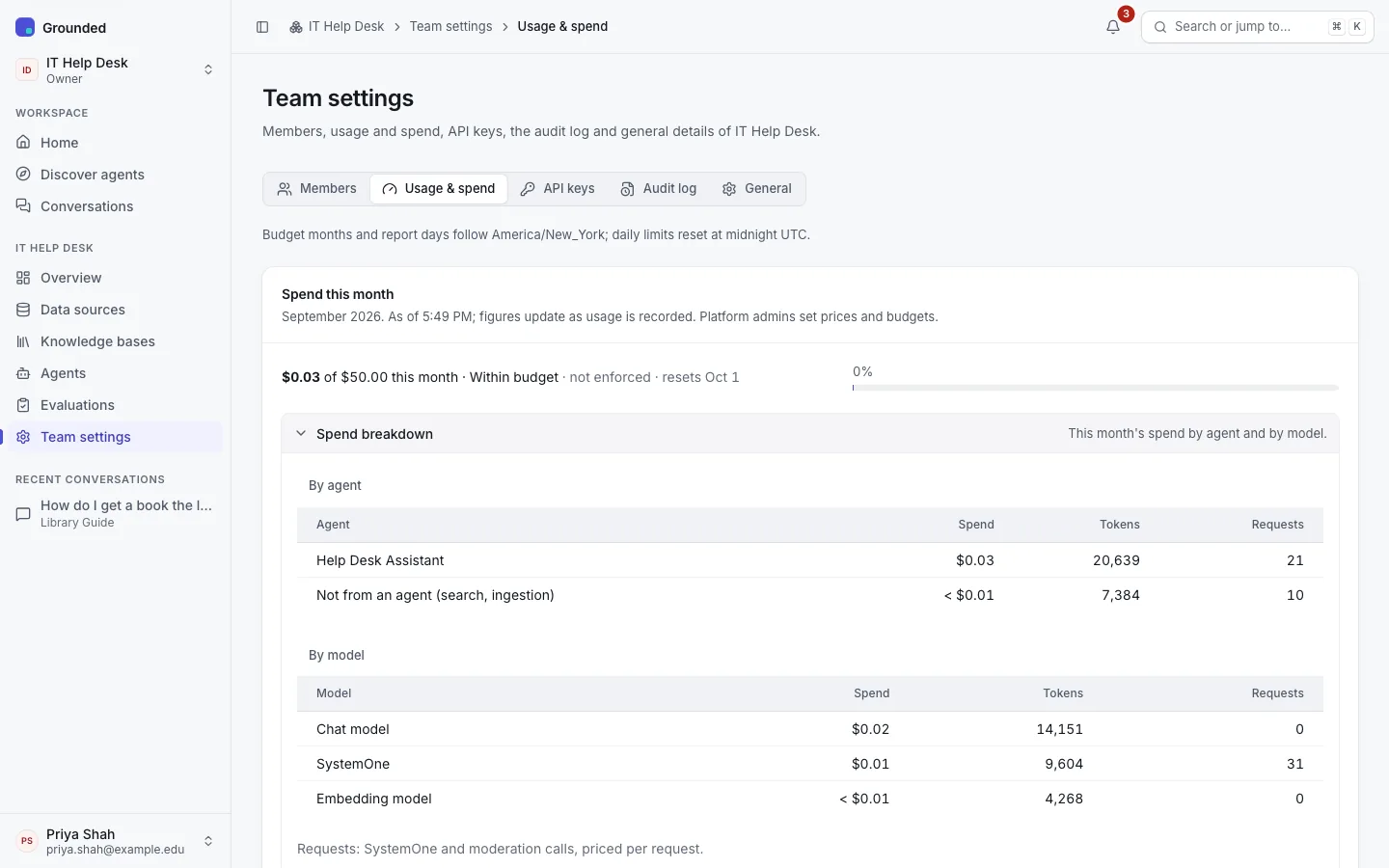
When the platform tracks costs, owners and admins see one line for this month:
$0.24 of $1.20 this month · Within budget · resets Oct 1
with a meter of the budget used. Spend breakdown shows spend by agent and by model. The team Overview shows the same line, and each agent's Analytics tab its own spend. Figures say when they were read ("As of 10:12 AM"), since usage is recorded as it happens.
Spend is calculated from prices your platform admins enter. Usage that has no price counts as zero and is flagged as unpriced in their reports.
Budgets
A platform admin can give your team a monthly budget. The month follows the platform's time zone.
- Track only: the budget shows progress ("not enforced"). Nothing is refused, and nobody is notified.
- Enforce: at the warning threshold (80% by default), the team's owners and admins are notified, and everyone in the team sees a banner (members without amounts). At 100%, everything that calls a model stops until the month ends, the budget is raised, or an admin grants an extension:
- chats in every channel and knowledge base searches are refused ("budget exhausted"); visitors to public agents see only "This assistant is unavailable right now";
- new ingestion waits: pending documents stay queued and crawls pause.
Nothing is deleted or failed, and work continues by itself when the budget allows. Budgets are checked against a figure cached for about 30 seconds, so a busy team can go slightly over.
If your team runs out, ask a platform admin for an extension (for this month) or a higher budget.